
AI Music Video Generator: Yuna
FablesoEntertainment
4.7622.00 Reviews
- Version
- 1.0.26
- Installs
- 100.00K
- Age Rating
- Everyone
Screenshots
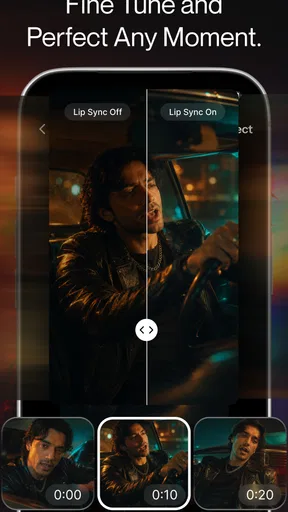
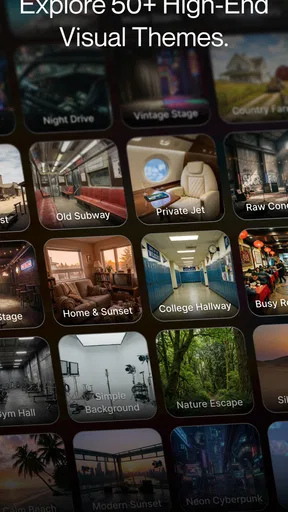
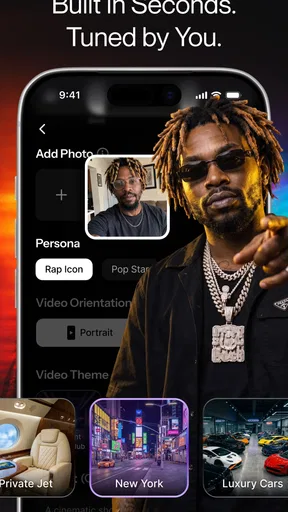
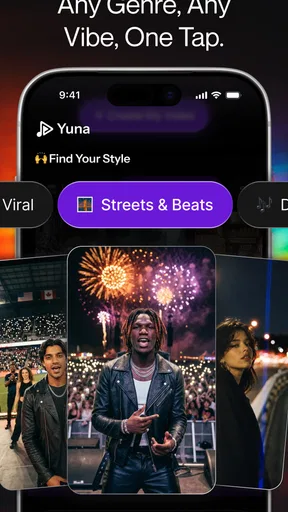
Our Review of AI Music Video Generator: Yuna
 Analysis by Appyee
I opened AI Music Video Generator: Yuna with a very specific job in mind: turn a song into a short visual piece without spending an evening learning a full video editor. That starting point matters, because this is not really aimed at people who want to build every cut, transition, and title by hand. It belongs in the entertainment category, and its appeal is the quick path from music to something shareable.
My first impression was that Yuna makes the most sense when the audio already carries the emotion. If I have a finished song, a rough demo, or simply a track I want to present in a more engaging way, an AI-assisted music video tool can remove the blank-page problem. Instead of opening a traditional editor and wondering what to place on the timeline, I can begin with the song as the central material and let the app guide the visual direction.
That convenience is also the main trade-off. A fast result is not the same as a carefully directed music video. Yuna is useful when speed, experimentation, and a polished-looking clip matter more than frame-by-frame control. If that sounds like your situation, it is worth understanding how the workflow feels before deciding whether the free download is enough for you.
From a finished song to a usable visual clip
I find the most useful way to judge a generated music clip is to separate the time spent making it from the time spent deciding whether it works. A quick first draft can be valuable even when it needs another pass, especially if I check the opening and the overall mood before polishing anything. That distinction also helps set realistic expectations for how the app holds up during longer or repeated sessions.
Starting with the right kind of material
The best starting condition is a song with a clear mood and a purpose. I would use Yuna for a teaser before releasing a track, a visual post for a social feed, a simple accompaniment for a personal recording, or a quick concept that helps me decide what a larger video should feel like. The app’s store summary describes it as an AI music video maker for creating song clips in minutes, and that short workflow is exactly where its value is easiest to see.
I would not begin with the expectation that the app will replace a director, editor, or motion designer. A song with several contrasting sections may need deliberate visual changes that an automated process cannot always interpret in the way I intended. Likewise, if the video must match exact lyrics, brand colors, choreography, or a carefully planned story, I would start in a conventional editor instead.
Before importing anything, I would make a small preparation checklist. I would choose the strongest version of the audio, decide whether the goal is a short social clip or a more complete visual presentation, and think about the feeling I want the imagery to communicate. That preparation sounds simple, but it prevents a common disappointment: blaming the generated result when the input itself has no clear visual direction.
The first handoff: giving the song a job
The important handoff is from my intention to the app’s interpretation. I am not just supplying sound; I am asking the system to translate rhythm and atmosphere into visual material. The clearer my intended mood, the easier it is to judge the result. For a reflective song, I might want restrained movement and spacious imagery. For something energetic, I would look for a stronger sense of momentum rather than a static slideshow feeling.
This is where Yuna feels different from a normal video editor. In a standard timeline, I make the visual decisions one by one. Here, the app’s attraction is that it helps bridge the gap between “I have a song” and “I have something visual enough to show.” That makes the tool approachable for musicians who are comfortable with audio but do not want to wrestle with layers, keyframes, and manual timing.
The downside is that the handoff is not perfectly transparent. An automated interpretation can be visually attractive while still missing the personal meaning of the track. I would treat the first generation as a draft, not as a final verdict on the song. The most useful mindset is to review it for direction: does the atmosphere fit, does the pacing feel alive, and does the imagery support the music?
Moving through the creation process
Once the project is underway, I would pay attention to whether the visuals remain connected to the song rather than merely decorating it. A good music clip does not need to illustrate every lyric literally, but it should feel as though the pictures belong to the same emotional world as the audio. Yuna’s quick-generation approach is most convincing when I use it to create that overall connection instead of demanding a precise narrative.
A practical workflow is to make one version with a broad mood, watch it from beginning to end, and then identify the weakest moment. I would not immediately start over after noticing one awkward section. First, I would decide whether the problem is the visual concept, the timing, or simply a mismatch between my expectations and the app’s automated style. That diagnosis tells me whether another generation is likely to help.
For a short promotional clip, I would also choose the most recognisable part of the song rather than automatically using the entire track. A concise excerpt can communicate the identity of a release more effectively than a longer video that takes too long to reach its strongest section. This is one of the less obvious advantages of thinking like an editor even when the app is doing much of the editing work: the input’s structure still affects the usefulness of the outcome.
Where the handoffs create friction
The workflow has several points where responsibility moves back to me. I provide the audio, evaluate the visual interpretation, decide whether the result is suitable for its audience, and then handle any final presentation choices the app does not cover in the way I need. That means “created in minutes” should not be confused with “ready without review.” I would always watch the full output before sharing it.
The biggest friction is creative rather than technical. An AI-generated clip can look coherent at a glance but become repetitive when watched with the complete song. It may also create a mood that is close to what I wanted but not quite right. In those cases, the app saves time on production while shifting time toward selection and judgement. I am no longer drawing every visual decision, but I still need to act as the editor.
There is also a practical question around expectations. Yuna is free to install, which makes it easy to try without committing money at the start. However, in-app purchases range from $4.99 to $299.99 per item, so I would inspect the purchase screen carefully before assuming that every part of the workflow is included at no cost. The broad range suggests that different users may encounter different levels of optional spending, and I would only pay after confirming that the result solves a problem I actually have.
What the finished result is good at
When the generated visuals fit the track, the result can give an otherwise plain audio post a much stronger presence. This is especially useful for independent musicians, casual creators, and people who need a visual starting point quickly. I can imagine using it to accompany a song announcement, make a mood-based preview, or test how an audience might respond to a visual identity before investing in a larger production.
The result is also valuable as a concept tool. Even if I do not publish the first clip, it can reveal whether a certain color mood, pace, or visual theme feels compatible with the song. That makes Yuna useful before the final production stage, not only after the music is finished. I could use the generated piece as a reference when explaining an idea to a human editor or when deciding which direction deserves more work.
For an everyday scenario, imagine finishing a song during the week and wanting to share a preview over the weekend. I would select the strongest section, create a visual version, watch it on a phone, and check whether the opening catches attention before the music has had time to build. If it does, I have a practical promotional asset without starting a full editing project. If it does not, I have learned that the chosen excerpt or visual mood needs work.
That phone-first test is important. A clip that seems impressive in a large preview can feel too busy or too slow on a small screen. I would judge the first few seconds, the readability of the overall motion, and whether the visuals distract from the audio. Yuna can help me get to a presentable draft quickly, but the audience still experiences the finished clip, not the speed of the creation process.
Comparing it with ordinary alternatives
Compared with a traditional mobile video editor, Yuna offers a more direct route from song to visual concept. A conventional editor gives me more control over exact cuts, overlays, timing, and revisions, but it also asks me to make those decisions manually. If I already know precisely what I want, the traditional option is likely better. If I mainly know how I want the song to feel, Yuna is the more comfortable place to begin.
Compared with a simple slideshow maker, the AI music-video approach is more suitable when the audio should drive the identity of the clip rather than sit underneath a fixed sequence of pictures. A slideshow can be the better choice for family memories, product images, or a presentation where every frame is predetermined. Yuna is more interesting when the music is the primary source of atmosphere.
It also differs from hiring a professional editor. A person can ask questions, understand a song’s story, and make intentional exceptions. Yuna is faster and more accessible for experiments, but it cannot replace that human conversation when the video has a complex message or a high-stakes audience. I would use the app to explore and prototype, then move to a more controlled process when the idea becomes important enough to justify it.
Who should try it, and who should skip it
I would recommend Yuna to a musician who has audio ready but no visual material, a creator who needs a quick song-based post, or a curious user who wants to explore AI-assisted entertainment tools without learning a large editing suite. Its free status lowers the barrier to testing, and the Everyone content rating makes it approachable for a broad audience. The developer is Fableso, and the app has built enough public interest to show a 4.7 average from around 29 thousand ratings.
I would be more cautious if I needed exact control over every scene. I would also skip it as my main tool if the project depends on accurate lyric synchronisation, a fixed commercial identity, specific performers, or a carefully staged storyline. Those needs are not impossible to care about here, but they make the automated route less efficient because I may spend too much time correcting a result that a timeline editor could have built correctly from the beginning.
People who dislike reviewing several creative variations may also find the process frustrating. The app reduces manual construction, not decision-making. I still need to choose the best direction, reject weak moments, and decide whether the finished clip represents the song honestly. That is a good trade for experimentation, but not for someone looking for a completely hands-off publishing button.
Practical details before installing
Yuna is a free entertainment app from Fableso, with a current version of 1.0.26 and support for Android 7.0 or later. That relatively broad system requirement means many older Android devices can at least meet the basic software requirement, although the experience of creating or previewing visual content can still vary with the phone itself. I would keep some storage available and avoid judging the workflow while the device is already struggling with other demanding tasks.
The app is marked for Everyone, which is helpful if the intended audience includes younger users, but that label should not be mistaken for a guarantee that every generated idea will suit every setting. I would still review the visuals before sharing them publicly, especially when the clip is connected to a personal song, a child-friendly channel, or a professional identity.
The public response is encouraging: the app has passed 100 thousand installs and has 622 written reviews. I see that as a reason to try it, not as proof that it will match every creative workflow. The version number and purchase range are also reminders to check the current in-app experience directly, particularly if I plan to rely on it for repeated projects rather than a one-off experiment.
My verdict after following the workflow
I see Yuna as a fast visual companion for music, not as a complete replacement for editing software. Its strongest moment comes at the beginning of a project, when I have a song but no clear visual path. It helps turn that uncertainty into a draft that I can watch, judge, and improve. That makes it genuinely useful for previews, mood tests, casual sharing, and early creative exploration.
The flow breaks when I expect automation to understand a detailed story or deliver a perfectly controlled final cut without supervision. The app can save the labour of assembling a first concept, but I still have to supply taste, context, and quality control. I would also approach optional purchases carefully, since the free installation does not mean every possible creation path has the same cost.
In my experience, the sensible way to use it is to start small: choose one strong section of a song, define the mood before generating, watch the entire result on the device where people will see it, and only then decide whether a paid option or a more advanced editor is justified. For quick music visuals, Yuna is worth trying; for exact film-making control, I would choose a conventional editor instead.
If I were recommending it to a friend, I would describe it as a useful first step between an audio file and a shareable visual idea. It is not magic, and the best results still depend on thoughtful input and honest review. But when the goal is to move from “I have a song” to “I can show people what this song feels like,” Yuna gives that transition a pleasantly short route.
Verdict
Strengths of AI Music Video Generator: Yuna
- Creates music videos quickly from simple text or music prompts.
- AI-generated visuals can add variety to social media content.
- Useful for users without video editing or animation experience.
- Helps turn original songs into more engaging visual presentations.
- Convenient mobile workflow for creating and sharing projects.
Limitations of AI Music Video Generator: Yuna
- Results may vary greatly depending on the prompt and source audio.
- Some features or exports may require a paid subscription.
- Generated visuals can occasionally look repetitive or inconsistent.
- High-quality video creation may require a stable internet connection.
- Export options and resolution may be limited on certain devices.
Similar Picks in This Category
View All
Google Play Games
Google LLC3.9

Netflix
Netflix, Inc.4.8

YouTube Kids
Google LLC4.2

Disney+
Disney4.4

Prime Video
Amazon Mobile LLC4.7

Steam
Valve Corporation3.2
Frequently Asked Questions
What is AI Music Video Generator: Yuna?
AI Music Video Generator: Yuna is a creative app designed to turn music and visual ideas into stylized music videos with the help of artificial intelligence. After selecting a song or importing audio, users can generally choose a visual concept, apply effects, and generate a video that matches the mood of the track. It is aimed at creators who want quick results without traditional video-editing skills.
How does Yuna create an AI music video?
Yuna typically combines uploaded or selected music with text prompts, visual themes, templates, and automated effects to produce a synchronized video. Depending on the available tools and subscription level, you may be able to describe a scene, select an artistic style, or adjust the appearance of generated clips. Processing time can vary according to the song length, video quality, and server demand.
Can I use my own music, images, or video clips in Yuna?
The app may allow users to import personal audio and, in some versions, additional images or video assets for customization. Before uploading anything, check the supported file formats, maximum duration, and storage permissions requested by the app. You should also make sure you own the necessary rights or have permission to use the music and other material, especially if you plan to publish the finished video.
Is AI Music Video Generator: Yuna free to use?
Yuna may be available as a free download, but some generation features, premium styles, higher resolutions, longer videos, or exports without limitations can require in-app purchases or a subscription. The exact offer may change by platform, region, and promotional period. Review the pricing page carefully before starting a trial, and check whether the subscription renews automatically through your app store account.
What should I know about privacy and exported videos?
Creating AI videos may require uploading audio, prompts, images, or other content to Yuna’s servers for processing. Before using the app, read its privacy policy to understand how files are stored, analyzed, and deleted, and whether content may be used to improve the service. Also review the export terms and AI-content rules if you intend to share videos commercially or on social media.
